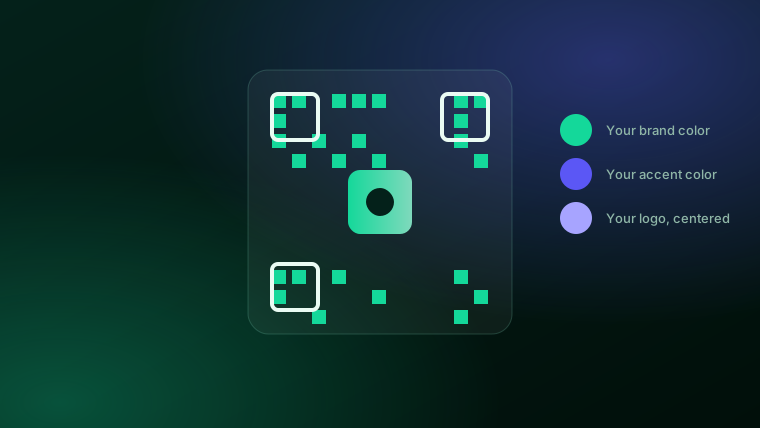
If you've only ever seen the plain black-and-white QR codes churned out by the first generator Google shows you, "custom QR code" might sound like a small thing. It isn't, once you're the one printing 200 flyers or a yard sign that sits outside for three weeks. Here's what actually changes, and how to think about it.
What makes a QR code "custom"?
A QR code is just a pattern that encodes a piece of text — usually a link. Nothing about the format requires it to be black and white. A custom QR code generator lets you set:
- Your brand colors — the code's foreground and background, so it matches your sign, flyer, or packaging instead of looking like a default template.
- Your logo in the center — most QR codes have enough built-in error correction to tolerate a logo covering the middle without breaking the scan.
- A tracked, editable link — instead of encoding the final web address directly, the code points to a short redirect link you control.
That last point is the one people miss. It's the difference between a code that's just decoration and one that's actually useful to your business.
Static vs. dynamic: the difference that actually matters
A static QR code has the destination baked in permanently. Print it, and that's the URL forever — if your menu moves to a new page, or your booking link changes, the code is dead and you're reprinting.
A dynamic QR code encodes a short link that redirects to wherever you tell it to, and you can change that destination anytime from a dashboard — no reprinting. Dynamic codes are also the only kind that can report back scan data, since every scan passes through the redirect first.
For anything you're printing more than a handful of copies of — menus, signs, packaging, business cards — dynamic is worth the extra setup. It's the difference between a one-time code and a piece of marketing infrastructure.
Where business owners actually use them
The use case decides what matters most. A few of the most common ones, each with its own considerations:
- Menus, flyers, and table tents — needs to survive printing at a small size and hold up next to your other branded materials. See printable QR codes for menus & flyers.
- Real estate signs and listing flyers — needs to be scannable from a few feet away outdoors, in daylight. See QR codes for real estate.
- Business cards and storefronts — usually links to a contact card, booking page, or review link, and benefits most from tracking so you know if it's actually getting scanned.
- Social and messaging profiles — including a WeChat QR code if you serve customers who use it. See creating a WeChat QR code for your business.
Make your first custom QR code today.
Your colors, your logo, real scan tracking — built into your Meridian engagement.
See pricing →What a QR code can and can't do
Worth being precise here, since it's easy to conflate a few different things:
- A QR code can hold a web link, a contact card (vCard), a WiFi login, or plain text.
- A QR code is generated to be scanned by a phone camera or scanning app — the same tool that makes a code isn't necessarily the same tool you'd use to look up what an existing code decodes to.
- A QR code is not the same thing as a traditional barcode (the kind on a retail product). They solve different problems — see QR code vs. barcode for the full comparison.
How to make one
- Pick your colors. Set them once, and every code you generate afterward uses them by default.
- Add your destination. A link, a contact card, or a WiFi login — whatever you want the scan to open.
- Download and print. A proper generator gives you a high-resolution file that holds up at print size, not just a screen-sized preview.
What to look for in a custom QR code generator
Plenty of no-cost tools online will make you a QR code. Fewer will make you one you can actually rely on for a real marketing push. Before you commit to one, check for:
- Brand colors and a logo slot — not just black and white.
- A genuinely high-resolution download — some no-cost tools cap you at a size that looks fine on screen and pixelates on a printed sign.
- Dynamic, editable links — so a typo or a moved page doesn't mean reprinting everything.
- Scan tracking — country, device, and time, so you can tell whether the flyer by the register is actually working better than the one in the window.
- No account bloat — if all you want is QR codes and brand images, you shouldn't have to buy a full website builder to get them.
The bottom line
A QR code costs nothing to print space-wise and takes a customer straight from a physical object to wherever you want them to go next. Making it match your brand and actually reporting back on scans is what turns it from a novelty into something worth building a marketing habit around.
Frequently asked questions
What makes a QR code "custom"?+
A custom QR code uses your own brand colors instead of plain black-and-white, and can include your logo in the center. It still scans exactly the same way — the customization is visual, so the code looks like it belongs to your business.
Is a no-cost QR code generator good enough?+
For a one-off, maybe. But most no-cost generators give you a static code with no way to change the destination link later, no brand colors, and no scan tracking. If you're printing a code on a sign, flyer, or menu that will be out in the world for a while, it's worth using a generator that lets you edit the link and see who scanned it.
Can I change where a QR code points after I've printed it?+
Only if the code is dynamic (it encodes a short redirect link you control, not the final URL directly). A static code is locked to whatever URL was in it when you made it — if the destination moves, the printed code stops working.
Do QR codes expire?+
No — a QR code itself doesn't expire. What can stop working is the page it points to, if that page is taken down or the link changes. A dynamic code protects against this because you can update the destination without reprinting anything.
What should I look for in a QR code generator?+
Four things: your own colors and logo (so it looks like your brand), a high-resolution download that's actually print-ready, scan tracking so you know if it's working, and the ability to edit the destination link later without reprinting.
How much does a custom QR code generator cost?+
Standalone business QR tools typically run from a few dollars a month to enterprise pricing. Meridian builds custom, tracked QR codes and brand images into its client engagements rather than selling a standalone QR subscription.